We all have projects sitting on our mental to-do or in-progress list for weeks, sometimes months. For me, such can be my evening side projects – software I want to build, materials to be learned, or additional goals outside of my work hours. The problem isn't lack of motivation, but daily life. I realized there is a clear parallel between software development problems and some of the mundane daily life struggles, and that software development teams have tackled and solved these issues a long time ago. You do not build entire applications in one go and instead break stories down into tickets, organize hierarchies and dependencies, and focus on completing small, atomic units of work. You do not need to read a book in one sitting. Each ticket is manageable and brings visible progress. Each chapter is manageable and provides satisfaction. What if we applied the same logic to our personal projects?
From Jira Boards to Daily Life
IT project management breaks everything down to tickets. Feature requests are each a ticket. A bug fix is a ticket. A spike or a research task, is also a ticket. This provides a framework for making complex work manageable.
Mundane daily life works pretty much in a similar fashion. Every book to read, task, chore, project, all accomplishments are fundamentally tickets. The difference comes from complexity – some are simple, such as buying groceries, while others need to be broken down into smaller pieces. Nobody renovates a kitchen in one evening, right? You need a visual plan, remove old materials, paint, etc.
I believe essentially everyone tries in their daily life to divide large or unappealing tasks into smaller chunks that can be completed in a simple manner and help towards the end goals.
My Notion Use Case for Daily Life
I've tried various tools to organize my projects, follow up on emails or complete tasks, and currently I like what Notion provides – the power derives from treating everything as pages, and pages can contain other pages. This creates natural infinite hierarchies where your project is a page containing task pages, which themselves contain session pages. And as for any ticket, your page can have attributes you define:
- Target Start and End Times
- Actual Start and End Times
- Time Spent, possibly as a calculated field
- Categories or tags
- Status (doing, done, blocked)
- Cost or Revenue for monetary calculations
Since I track evening projects where I might bill my time, I use hourly rates and revenue calculations. Similarly you can just as easily track any metric - time invested, pages written, exercises completed, etc.
The Mindset Shift
The real value for me is not necessarily the tool itself or the formulas, but the approach with automation.
Instead of staring at my project, where throughout the project I would be discovering new issues, new possibilities, eventually with a overwhelming large development project, I focus on completing for example a "Session 2: Styling & Layout". Each session in the project is an atomic one evening unit. Each completion is visible progress and I can easily summarize my time. In addition to managing my side projects, it provides a feedback loop, a learning opportunity what to expect in upcoming projects – after a few projects I can see patterns and be more realistic.
This is also how software teams deliver – instead of thinking about whole project you create stories, tasks, tickets. One atomic unit at a time. For unappealing or extensively large tasks, the solution isn't more willpower - it's better breakdown. Make progress visible enough to build and continue on the momentum naturally.
2-Tier and 3-Tier Hierarchies with Automation
Depending on project complexity I use two different 2- or 3-tier structures. For straightforward projects, I just need a top level, the project itself, and individual tickets I can complete in one sitting. The key for me is that I want to log uninterrupted chunks of work and that is always the lowest ticket level – a "sitting".
Example: Demo Project Alpha has tasks like "User Authentication" (3.5 hours), "Database Schema Design" (4.75 hours), "API Integration" (3 hours). Each task is something I can sit down and finish. The project automatically calculates total time and revenue by summing up the tasks.
More complex projects with tasks spanning multiple evenings, or if I might get interrupted, I create a third tier. This creates a logic where there is a top project level, which breaks down into a middle tasks layer, where tasks can have individual sessions.
Example: Demo Project Beta has "Frontend Development" as a task, which contains three sessions: "Component Setup" (2.5 hours), "Styling & Layout" (2 hours), "State Management" (3.75 hours). I log my time at the session level - the most granular unit. Everything automatically rolls up.
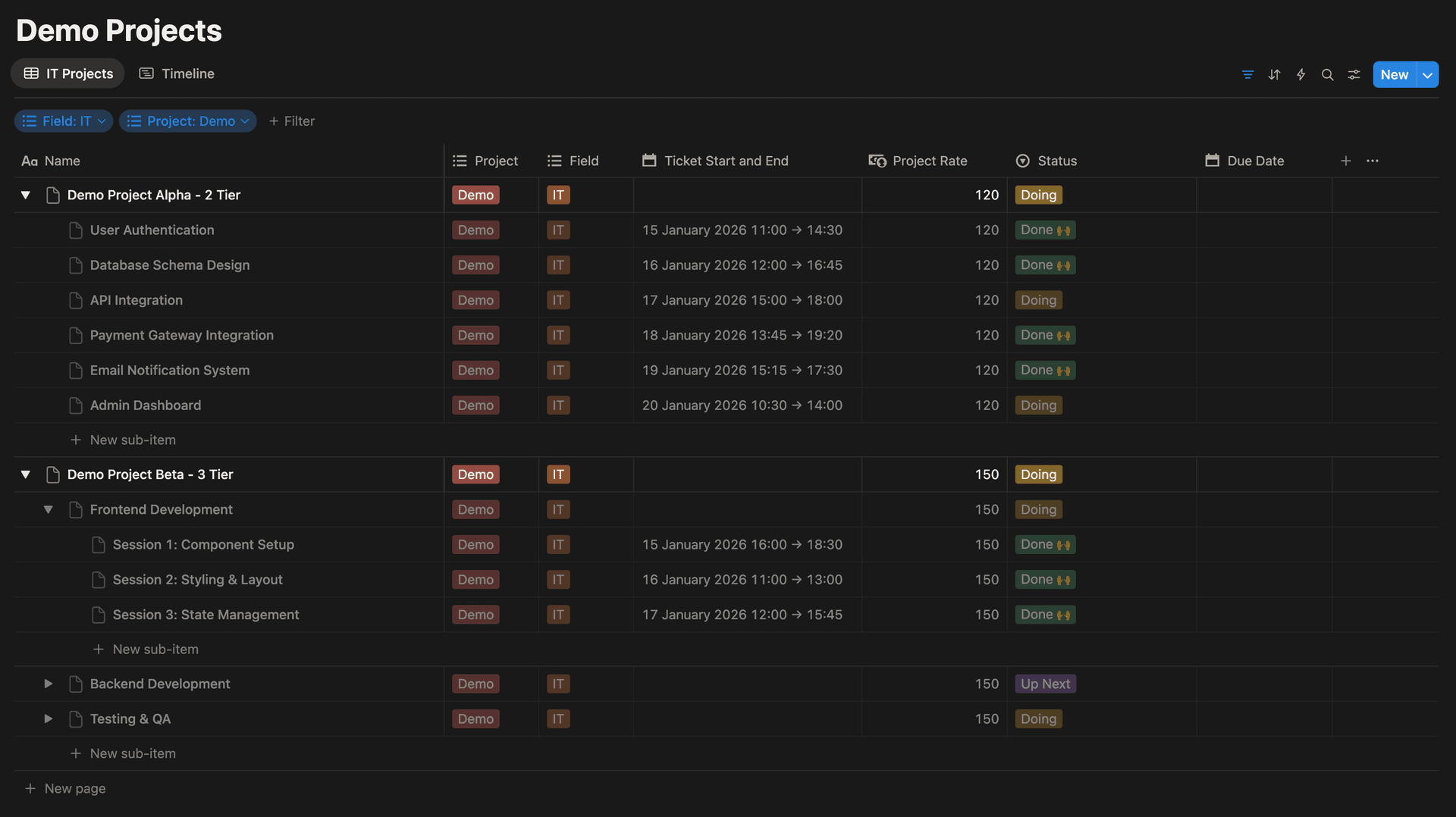
The beauty is that this retains automation across both structures in the same database. I work based on my needs or the project's needs. The magic for me happens with the capability of automatic calculation of totals without manual addition. Whether I'm tracking revenue, time invested, or any other metric, the numbers flow upward automatically. The formula that makes this work:
if(prop("Ticket Revenue") != 0, prop("Ticket Revenue"),
   if(prop("Story Revenue") != 0, prop("Story Revenue"),
      prop("Sub-item").map(current.prop("Story Revenue")).sum()))
Here I am using some helper columns, "Ticket Revenue" calculates the revenue for one sitting based on rate and time. This helper column can be hidden. A "Story Revenue" is a second helper column for "middle layer". If time is logged into the lowest tier, then "Story Revenue" acts as an aggregated value for middle layer. If no lower tier logging, "Story Revenue" is calculated based on the row's time and rate. Finally, "Revenue" sums up the project's total revenue, but with the help of such if-logic and mapping, it will also display revenues for the sub-page rows. The logic handles both tier levels automatically. Tasks with direct revenue logging use the particular row's data. Tasks without logging look at their children and sum the values. This pattern can be used for anything – time, count of tasks, written or read pages - whatever metric matters for your goal.
Getting Started
Start by creating a database, add basic key properties, create a sub-page setup to achieve 2 tiers and start logging. For automation use rollups or map functions as shown previously. With increasing complexity the shift to a 3-tier logic is simple and the structure grows naturally with your needs.
The goal is not obsessive analytics or tracking in itself. Make your wishes manageable by breaking them down systematically, whether it is an evening project, home improvement, learning goal or training. One ticket at a time.
Comments
No comments yet. Approved comments appear here.
Leave a comment